Email List Components

Discover list layouts from top brands. Perfect for newsletters, promotional emails, and transactional messages.
2 components
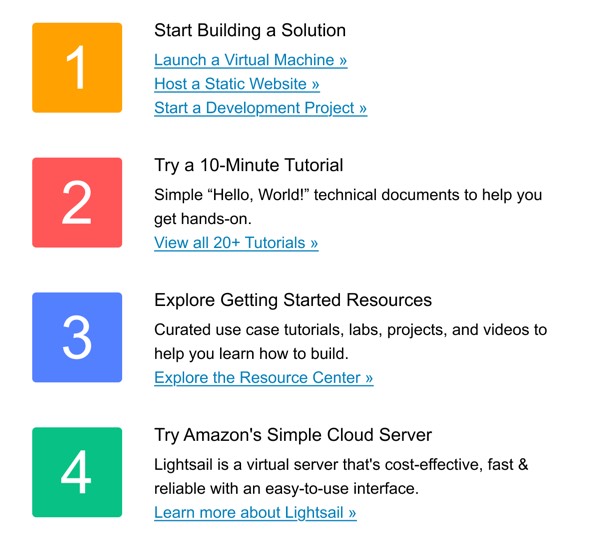
Getting Started with Resources - AWS email component (list layout)
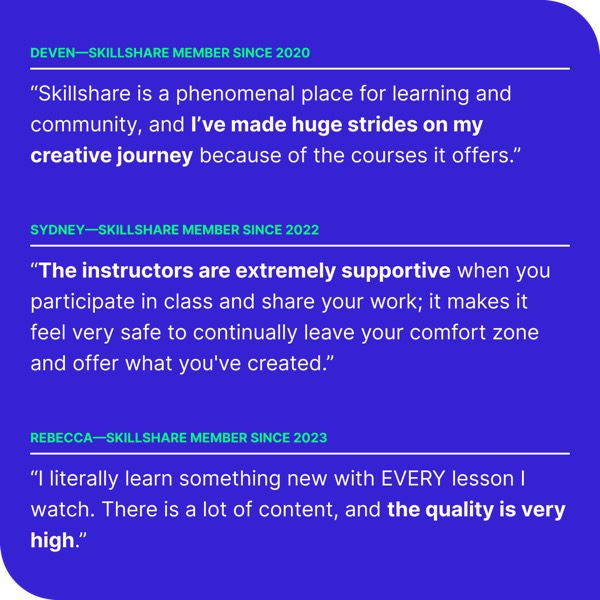
User Testimonials - Skillshare email component (list layout)

Email List Design Guide

List layouts are ideal for presenting multiple items, features, or pieces of information in a clear, scannable format. Well-designed lists help recipients quickly digest content and find what matters most to them.

Essential Elements

  • Clear structure: Consistent formatting for each list item
  • Visual markers: Icons, bullets, or numbers to organize content
  • Scannable content: Brief, easy-to-read text for quick comprehension
  • Logical ordering: Organized by priority, chronology, or category

Design Considerations

Mobile Optimization

Lists must remain readable and organized on mobile:

  • Adequate spacing between list items for touch targets
  • Responsive text sizing that scales appropriately
  • Icons and images that resize without losing clarity
  • Simplified layouts that work well when stacked

Content Hierarchy

Your email list should guide readers through information:

  • Use typography to distinguish headings from body text
  • Include visual elements (icons, images) to enhance scanning
  • Maintain consistent spacing between list items
  • Group related items when presenting multiple categories

List Types

Browse the components above to see different list approaches:

  • Feature lists: Highlight product features or benefits with icons
  • Article lists: Display blog posts or content with thumbnails
  • Bullet lists: Simple, text-focused lists for quick information
  • Numbered lists: Sequential steps or ranked items
  • Icon lists: Visual markers that enhance comprehension

Implementation Tips

  1. Keep items consistent: Use similar length and structure for each item
  2. Use visual hierarchy: Make headings and body text clearly distinct
  3. Include white space: Adequate spacing improves readability
  4. Test across clients: Ensure bullets and formatting render correctly
  5. Optimize for scanning: Front-load important information in each item

Frequently Asked Questions

What is a list email layout?

A list layout is a structured email design pattern commonly used for organizing content in email marketing. These components provide tested, responsive structures that work across all major email clients.

How do I copy these list components to Figma?

Simply click the "Copy Figma Component" button on any component card, then paste it into your Figma file using Cmd+V (Mac) or Ctrl+V (Windows). The component will be ready to customize immediately.

Are list layouts responsive?

Yes, all list layouts are fully responsive and optimized for desktop, tablet, and mobile email clients including Gmail, Outlook, and Apple Mail.

Can I mix different layout types in one email?

Absolutely! You can combine multiple layout types within a single email design. Mix list layouts with other patterns to create unique, engaging email experiences.
